Activity Logs
Overview
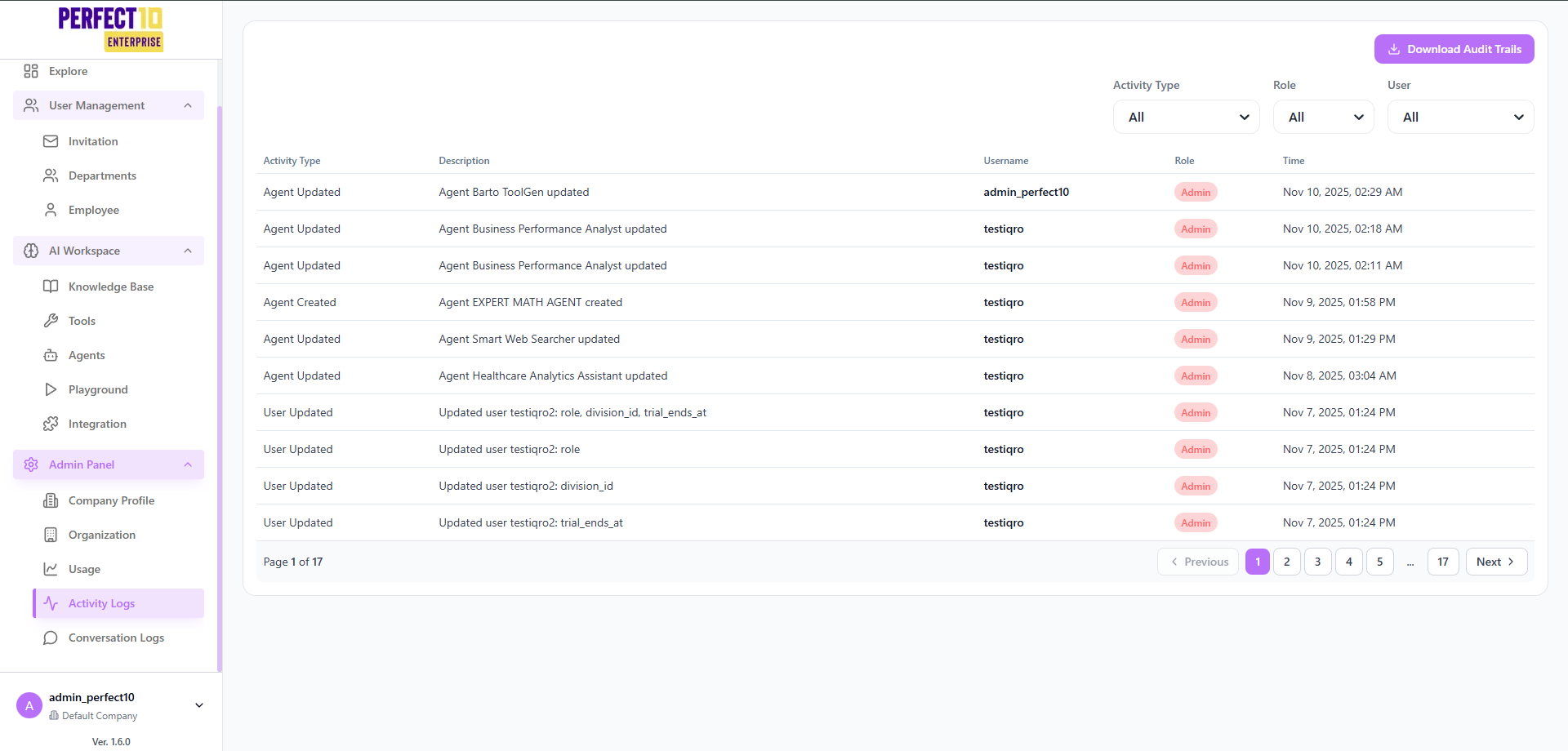
The Activity Logs page in Perfect10 Pro - Enterprise Platform provides a comprehensive view of user and system activities across the platform.
This feature helps administrators monitor operational changes, track user behavior, and maintain accountability for every action executed in the system.
It serves as a core auditing tool, ensuring transparency and compliance with enterprise governance standards.
Log Overview
The main section of the page displays recorded actions with filters for easier navigation and analysis:
- Activity Type: Identifies the type of event (e.g., agent created, agent updated, user updated).
- Role: Indicates the user’s role at the time of the action (e.g., Admin, Operator, Staff).
- User: Displays the username of the person who performed the activity.
- Time: Shows the exact timestamp when the event occurred.
Administrators can filter, search, and export audit logs for review or compliance reports.
Filters and Controls
| Filter | Description |
|---|---|
| Activity Type | Filter logs by event type such as agent or user modifications. |
| Role | Limit the results to specific user roles (Admin, Manager, Operator). |
| User | Search for logs performed by a specific user or account. |
| Date Range | View logs within a defined time period for focused analysis. |
| Download Audit Trails | Export up to 30 days of logs in .log or .txt format. |
Tip: Use filters before exporting logs to optimize data size and clarity.
Sample Activity Log Entries
Example: The table below shows sample log entries for illustration purposes only.
| Activity Type | Description | Username | Role | Time |
|---|---|---|---|---|
| agent updated | Configuration for Agent Orion ToolGen was modified. | alex_admin | admin | Nov 10, 2025, 02:29 AM |
| agent updated | Model parameters for Business Metrics Analyst Agent were updated. | nlee_ops | admin | Nov 10, 2025, 02:18 AM |
| agent created | New AI agent Expert Math Assistant was successfully created. | nlee_ops | admin | Nov 9, 2025, 01:58 PM |
| agent updated | Knowledge base link updated for Smart Data Searcher Agent. | mchen_audit | admin | Nov 9, 2025, 01:29 PM |
| user updated | Updated clara_h: role, department, and trial period extended. | alex_admin | admin | Nov 7, 2025, 01:24 PM |
Page: 1 of 17
Navigation available: Previous | Next
Log Export and Retention
Logs can be downloaded through the Download Audit Trails button.
Exported files are limited to the last 30 days of activity for performance and data protection purposes.
Supported formats:
.log(plain text format for system parsing).txt(readable format for manual review)
Note: Audit data older than 30 days is archived automatically and can only be accessed by system administrators.
Key Features
- Real-Time Event Recording – Automatically captures all platform actions with contextual data.
- Detailed Filtering – Refine results by event type, user, or role for faster traceability.
- Secure Export Options – Download activity data safely for auditing and compliance.
- Scalable Pagination – Handles large datasets efficiently for enterprise-scale monitoring.
Best Practices
- Review Activity Logs regularly to detect anomalies or policy violations.
- Use descriptive agent names to make logs easier to interpret.
- Restrict access to logs to authorized admin roles only.
- Combine with Audit Trails for deeper metadata and compliance records.
Note: All actions recorded in Activity Logs are immutable and reflect verified system events.