Invitation Code Management
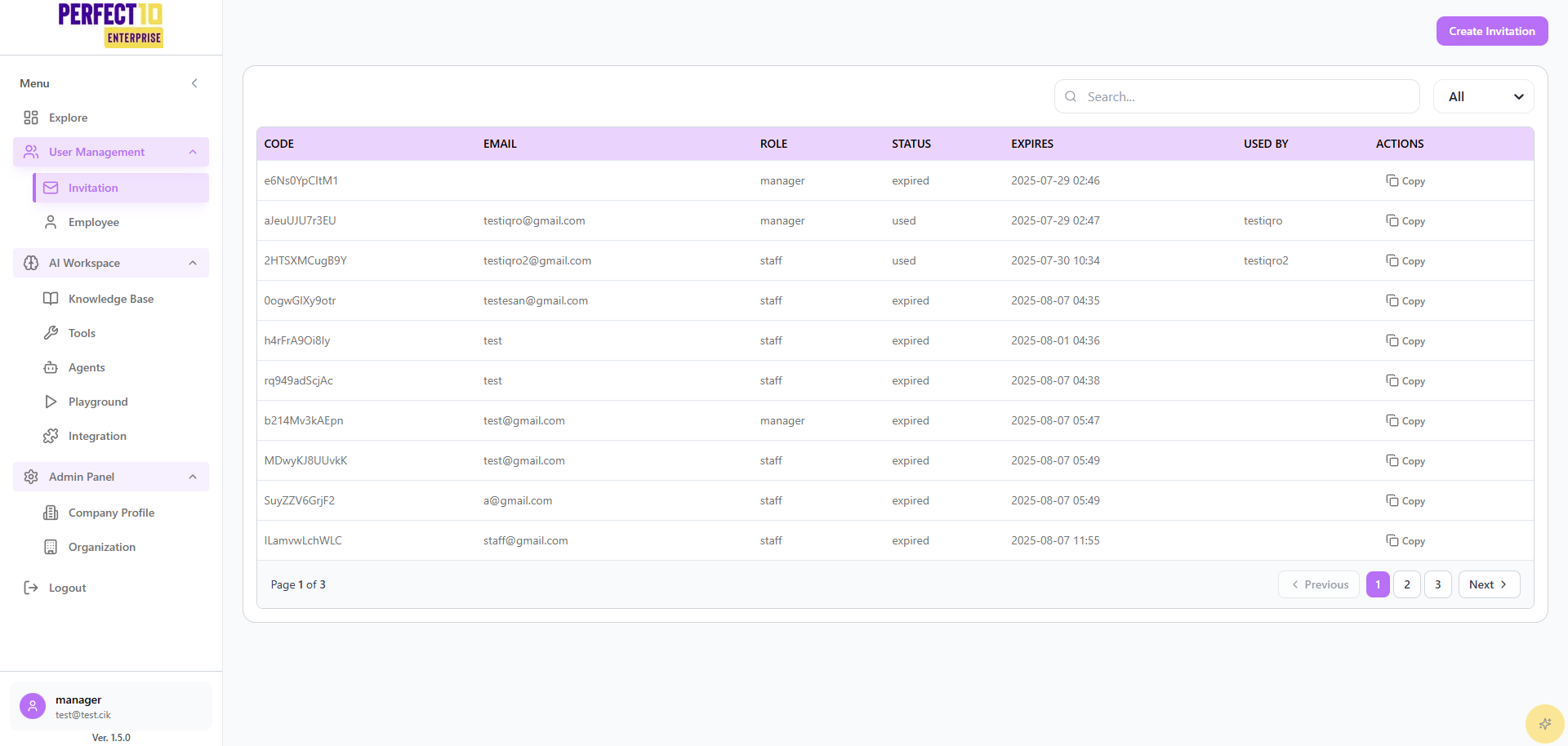
Invitation System for Managers
Perfect10's Invitation system allows managers to create and manage invitation codes specifically for onboarding new staff members within their division. Manager permissions are limited to staff-level invitations.
Accessing Invitation Management
- Navigate to the Invitation menu under the Users section in the main sidebar
- The Invitation Codes dashboard will display all existing invitation codes
Invitation Codes Overview
The invitation list includes the following columns:
- Code: The unique invitation code generated by the system
- Email: The email address the invitation was sent to (if specified)
- Role: The assigned role for the new user (manager can only create staff roles)
- Status: Current status of the code (Active, Used, or Expired)
- Expires: The expiration date and time of the invitation code
- Used By: The username of who redeemed the code (if used)
- Actions: Available operations for each code (Copy only)
Manager Permissions
Allowed Actions
- Create invitation codes for staff roles only
- View all invitation codes within the division
- Copy invitation codes for sharing
- Filter and search through existing codes
- Monitor code usage and expiration
Restricted Actions
- Cannot create invitation codes for admin or manager roles
- Cannot delete or modify existing invitation codes
- Cannot change email assignments or expiration dates after creation
- Cannot access invitation codes from other divisions
Creating Staff Invitations
- Click the Create Invitation button
- Fill in the required details:
- Email address (optional but recommended)
- Role selection will be automatically set to staff (manager limitation)
- Generate the invitation code
Managing Invitation Codes
Copying Invitation Codes
- Locate the invitation code you want to share
- Click the Copy button in the Actions column
- Share the code securely with the intended staff member
Filtering and Monitoring
- Use the Filter Status dropdown to view codes by status:
- All: Show all invitation codes
- Active: Currently valid unused codes
- Used: Already redeemed codes
- Expired: Codes that have passed their expiration date
Best Practices for Managers
- Email Binding: Always specify email addresses for better tracking and security
- Secure Distribution: Share invitation codes through secure communication channels
- Expiration Monitoring: Keep track of code expiration dates
- Usage Tracking: Monitor which codes have been used and by whom
Security Considerations
- Role Limitation: Managers can only create staff-level invitations
- Email Verification: Consider using email-bound codes for added security
- Expiration Management: Set appropriate expiration dates based on onboarding timelines
- Audit Trail: All invitation activities are logged for security review
Note: Manager invitation access is designed to streamline staff onboarding while maintaining proper security controls and role-based limitations.
Tip: Create invitation codes in advance for planned hires and set expiration dates that align with their expected start dates.
For invitation requirements beyond staff roles or for bulk onboarding needs, please contact your system administrator.