Interacting with AI Agents
Overview
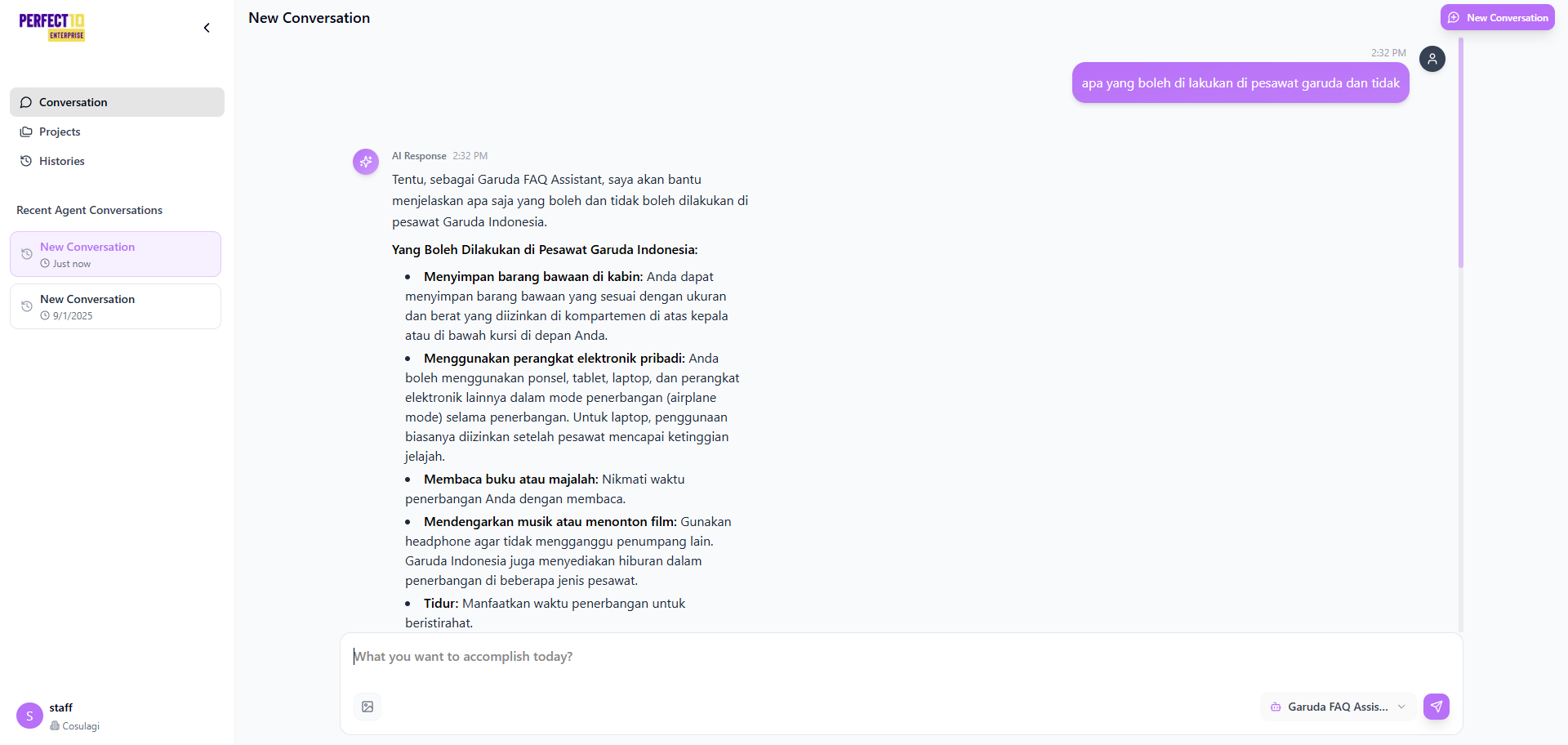
The Interacting with AI Agents feature enables staff to communicate directly with assigned AI agents in real time.
This capability allows staff members to deliver accurate, consistent, and context-aware responses to customer inquiries using pre-configured AI models and knowledge bases.
By leveraging the assigned agents, staff can efficiently handle customer interactions, validate information, and maintain service quality across multiple languages and domains.
Key Features
- Real-Time Interaction – Engage directly with AI agents to respond to customer inquiries instantly.
- Agent Selection – Choose from assigned agents, each configured with unique personas and linked knowledge bases.
- Response Review – Verify agent-generated answers for accuracy and tone before sharing with customers.
- Multilingual Support – Communicate seamlessly in multiple languages, depending on the agent’s configuration.
How to Interact with AI Agents
- Log in to the Perfect10 platform and navigate to https://perfect10.id/chat.
- Select the Chat tab from the left sidebar.
- From the Select Agent dropdown, choose an available agent (e.g., Customer Support Assistant).
- Review the agent’s description and linked knowledge base for context.
- Enter a customer query in the chat input field (e.g., “What are today’s product prices in East Java?”).
- Press Enter to send the message.
- Review the agent’s response for accuracy and completeness.
- Save or bookmark the interaction under Chat History for future reference.
Example Scenario
A customer requests pricing information. The staff member:
- Opens the Chat interface at https://perfect10.id/chat.
- Selects Product Information Assistant from the agent dropdown.
- Enters the query: “Current product prices for today.”
- Receives a detailed response with a breakdown of available products and daily price updates.
- Reviews and forwards the verified response to the customer.
Best Practices
- Understand Agent Scope – Review each agent’s purpose and linked knowledge base before use.
- Validate Responses – Double-check critical or time-sensitive data before sharing with customers.
- Use Appropriate Language – Keep communication professional and aligned with company standards.
- Leverage Multilingual Support – Utilize language capabilities to serve diverse customer bases.
- Maintain Consistency – Cross-reference with Chat History to ensure continuity and avoid redundant replies.
Note: Staff members can only interact with AI agents assigned by administrators.
Tip: Combine real-time interactions with Chat History reviews to maintain consistency and improve service accuracy.