Chat History
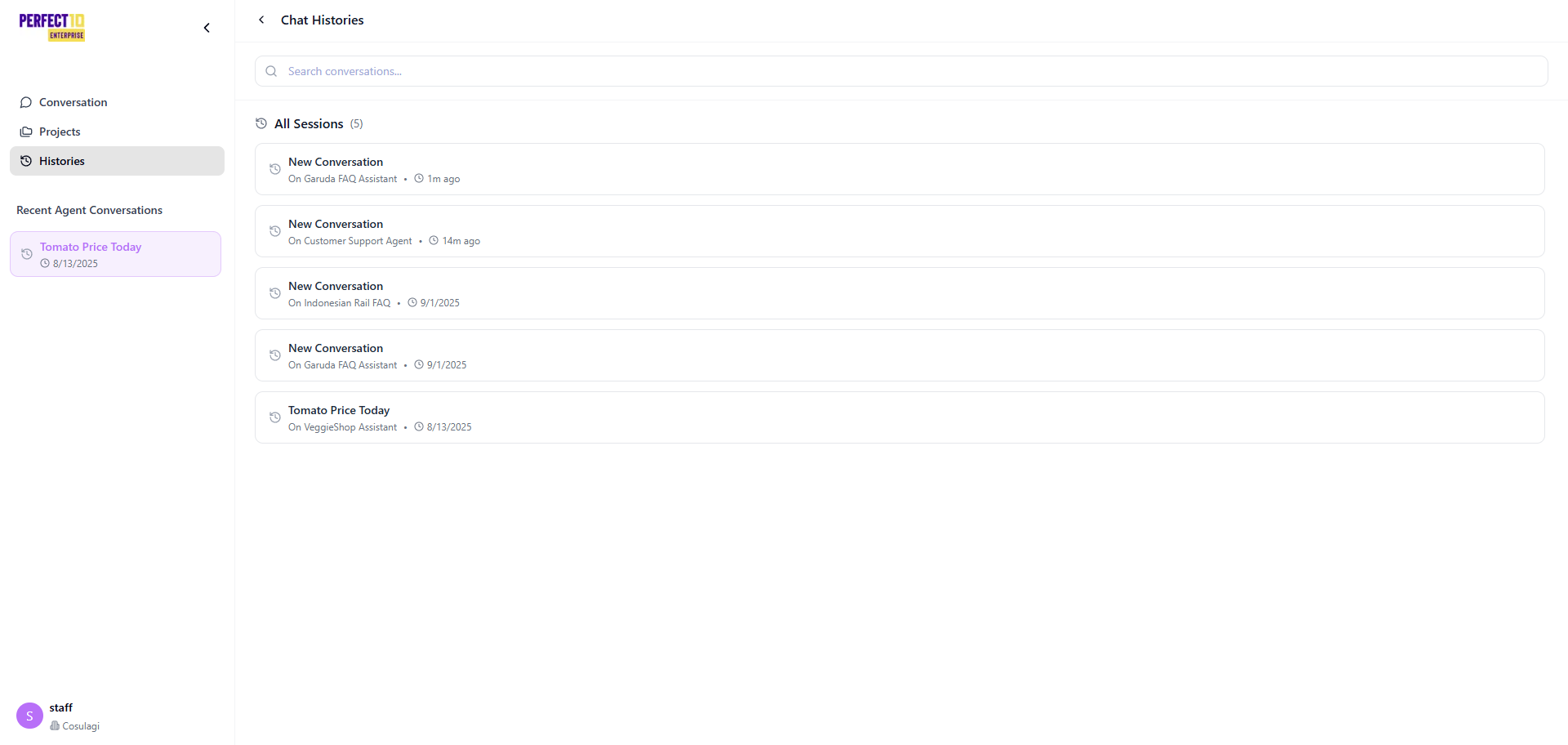
Overview
The Chat History feature allows staff members to view, search, and manage previous interactions with assigned AI agents.
It ensures communication continuity, supports issue resolution, and maintains consistent responses across customer interactions.
This feature is essential for reviewing past inquiries, validating agent responses, and improving the quality of ongoing customer engagements.
Key Functions
- View All Conversations – Access a chronological list of all chat sessions handled by the assigned agents.
- Filter by Agent – Focus on specific AI agents (e.g., Customer Support Bot) for detailed review.
- Search Conversations – Locate specific interactions using keywords, topics, or customer identifiers.
- Start New Conversations – Initiate a new chat directly with an assigned agent to continue assisting customers in real time.
How to Access
- Log in to the Perfect10 platform.
- Navigate to https://perfect10.id/chat.
- Select Chat History from the left navigation panel.
- Use one of the available options:
- View All Conversations – Browse all chat logs, sorted by date or assigned agent.
- Filter by Agent – Choose an agent (e.g., Customer Support Bot) to review its specific history.
- Search Conversations – Enter keywords such as
order statusorproduct availabilityto locate related chats. - Start a New Conversation – Click New Conversation to begin a session with a selected agent.
Once a new conversation starts, enter the customer’s query (e.g., “What is the current product price?”) and press Enter.
The agent’s response will appear in real time, and the interaction will be automatically logged for future reference.
Example Scenario
A customer requests updated pricing information.
The staff member:
- Opens Chat History at https://perfect10.id/chat.
- Filters the view to the Product Assistant agent.
- Searches for the keyword
"product price update". - Reviews a previous chat log detailing last week’s prices.
- Starts a new conversation to confirm and provide the latest pricing information.
Best Practices
- Use Filters Efficiently – Narrow down conversations by agent or date range to save time.
- Leverage Search – Use keywords for quick access to previous customer interactions.
- Verify Consistency – Ensure AI responses align with the latest company data and pricing.
- Maintain Professional Tone – When following up with customers, reference past interactions clearly and courteously.
Note: Chat History supports multilingual input, enabling seamless searches in multiple languages.
Tip: Regularly review chat logs to identify recurring questions and improve future AI responses.